×

iFour Logo

Quick Summary

A U.S.-based education company needed a simple and secure way for students and teachers to communicate online, as their old system was difficult to manage and lacked proper control.

iFour Technolab developed a centralized Communication and Coordination Tool for Educators that made chatting, file sharing, and real-time collaboration easier. The platform improved safety, teacher visibility, and student participation while creating a better online learning experience.

Impacts Observed:


85%

Better Communication

90%

Improved Engagement

75%

Faster Collaboration

80%

Better Monitoring

88%

Higher Efficiency

About Customer

The client is a U.S.-based digital marketing company that builds websites, mobile apps,
and online platforms for businesses and educational solutions.

Industry: Education / Digital Services

Geography: United States

Why They Came to Us:

  • Their old system was slow and difficult to manage
  • There was no proper Digital Classroom Communication System
  • Teachers could not monitor student activities properly
  • File sharing and discussions were unorganized
  • Students needed a safe space to communicate and learn
Customer
call to action

Secure your database security with our Azure SQL Database development services .

Client Success Stories

See how we've transformed businesses with custom software solutions

Challenges

Without a proper Communication Tool for Educators, managing student and teacher
communication create confusion and operational delays. The key challenges are listed below:

1

Communication between students and teachers was unorganized

2

No reliable Teacher Student Communication Platform

3

Teachers had limited control over conversations

4

Low student participation during virtual learning

5

Lack of a strong Real-Time Student Engagement Platform

Our Solution

We built a centralized Communication Tool for Educators that helps students and teachers connect,
share resources, and collaborate safely from one platform.

Web Portal

Let’s go through the key features included:


  • Safe Chat System
    A Safe Chat Platform for Students and Teachers for secure communication.
  • Group Messaging
    Students and teachers can send messages, images, and important links in group discussions easily.
  • File Sharing
    Users can quickly share notes, study materials, and important documents during conversations.
  • Room Creation
    Students can create chat rooms for discussions, study sessions, and collaborative learning.
  • Teacher Controls
    Teachers can manage users for better classroom safety and communication control.
  • Tasks and Notes
    Users can create tasks and save important notes during conversations for better organization.
Mobile App

User Mentions

Admins can mention specific users to improve response time and communication flow.

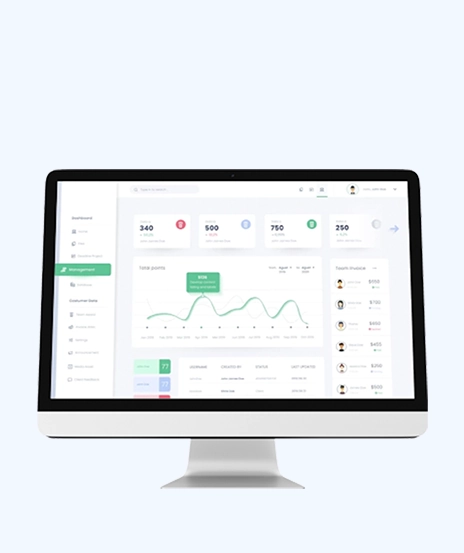
Admin Dashboard

The dashboard helps manage users, rooms, reports, and platform activity with better visibility.

Mobile-Friendly Access

The platform works smoothly on mobile devices for learning anytime and anywhere.

Outcome

The new system made communication faster, safer, and more organized. Teachers gained better visibility, while students enjoyed a smoother learning and collaboration experience.

With strong Secure Collaboration Software for Education, the business improved online engagement, simplified classroom management, and created a better digital learning environment.

call to action

Improve workflows and live monitoring with powerful BI dashboard development services

Security, Compliance & Governance

  1. Secure access for students, teachers, and admins
  2. Controlled permissions for safe communication
  3. Reliable tracking of user activities and discussions
  4. Safe storage of files and learning materials
  5. Centralized reporting for better transparency
  6. Scalable security for future platform growth
How We Built It

(Technology Stack & Architecture)

Programming Language: PHP 5.x, JavaScript
Web Server: Apache
Database: MySQL, Version Control: SVN
Client Technology: JavaScript, jQuery, AJAX
Application Type: Web Application

Impact That Mattered

The Communication Tool for Educators improved digital learning and made classroom communication more effective.

  • Faster student and teacher interaction
  • Better classroom visibility and control
  • Improved file sharing and resource access
  • Stronger student participation and engagement
  • Safer online communication environment
  • Better workflow management for teachers
  • Higher productivity across the education platform
Dashboard
“This platform has made online communication much easier for our students and teachers. Everything is now more
organized, secure, and easier to manage. It helped improve both learning and collaboration.” — Operations Manager

iFour Technolab developed a reliable Communication and Collaboration Tool for Educators that helps educational businesses improve communication, collaboration, and classroom safety.

With secure messaging, better teacher controls, and stronger engagement tools, the platform creates a smoother and more effective digital learning experience.

  • Smooth deployment with minimal disruption
  • Easy onboarding for students and teachers
  • Secure setup for communication workflows
  • Continuous monitoring for better performance
  • Regular updates for improved functionality
  • Dedicated support for quick issue resolution

Build scalable and secure education platforms with our expert custom software development services.

Get In Touch Now
contact team
talk with team

Get In Touch With Us

We encourage you to contact us with any questions or comments you may have.

image

Our Portfolio

Take a look at our latest projects, where digital transformation comes to life.

Reducing Support Efforts with an Automated Help Generation System

Reducing Support Efforts with an Automated Help Generation System

This solution focuses on generating help content. It provides support, reduces workload, and improves user experience.

Impacts Achieved

85%
Better guidance
75%
Boost Onboarding
88%
Higher Productivity
  View Case Study  
Driving Translation Accuracy with Custom Word Add-in Development

Driving Translation Accuracy with Custom Word Add-in Development

This platform helps manage translation workflows. It assigns tasks, improves coordination, and supports multilingual work.

Impacts Achieved

90%
Better Translation
85%
Improved Efficiency
4X
Faster Data Access
  View Case Study  
Competitor Analysis Portal for Smarter Market Intelligence and Faster Business Decisions

Competitor Analysis Portal for Smarter Market Intelligence and Faster Business Decisions

We developed this tool for market analysis. It tracks trends, gathers insights, and supports strategy.

Impacts Achieved

85%
Better Visibility
75%
Faster Decisions
80%
Live updates
  View Case Study  
Redefining Identity Management with Universal Unique Identifiers

Redefining Identity Management with Universal Unique Identifiers

This system was designed to generate unique IDs across platforms. It prevents duplication, maintains consistency, and supports scalability.

Impacts Achieved

90%
Better Tracking
80%
Faster Management
82%
Higher Efficiency
  View Case Study  
Improving Project Visibility & tracking with Earned Value Management Solution

Improving Project Visibility & tracking with Earned Value Management Solution

We built this system for project tracking. It compares progress, manages costs, and improves planning.

Mitigating Climate Risks in WGE’s Project Execution

Mitigating Climate Risks in WGE’s Project Execution

We built this solution to help businesses manage risks. It identifies issues, tracks them, and supports better decisions.

Impacts Achieved

95%
Climate Data Accuracy
70%
Boost Data Management
97%
Enhance Overall Efficiency
  View Case Study  
 
Blog Our insights
AI in Legal Practice: Powerful Use Cases Every Lawyer Should Know

10 September 2026

Kapil Panchal

AI in Legal Practice: Powerful Use Cases Every Lawyer Should Know

Quick Summary Lawyers use AI to research faster, draft/review contracts, review large documents, track compliance, and automate legal workflows. However, they must verify...


How to Use Power BI for Sales Forecasting (Guide for CTOs)

06 August 2026

Kapil Panchal

How to Use Power BI for Sales Forecasting (Guide for CTOs)

Sales Forecasting isn't optional anymore. Whether you are a startup or a mid-level enterprise, every decision you make today depends on how well you predict the future. Instead...
AI in Power BI - Top Use cases and Best Practices

03 August 2026

Kapil Panchal

AI in Power BI - Top Use cases and Best Practices

Quick Summary: Power BI uses AI to automatically point out patterns, identify anomalies, and create forecasts, providing analysts and executives with the insights necessary...

Full Project Display
1 / 4