
































































C# vs Java: Key Differences Explained
C# and Java remain the popular languages, offering robust functionality, libraries, and a huge developer community. However, both have certain distinctions leading to great confusion...


601 & 612, The Times square Arcade, Near Baghban party plot, Thaltej - Shilaj Road, Thaltej, Ahmedabad, Gujarat - 380059
Listening is fun too.
Straighten your back and cherish with coffee - PLAY !

KeyCloak is an open-source identity and access management (IAM) solution for modern Java application development services. It enables developers to easily add authentication and authorization to their applications while providing robust security features such as multi-factor authentication, role-based access control, and fine-grained authorization policies. KeyCloak also offers a range of customization options, including the ability to customize required actions.
In this blog, we will explore the significance of KeyCloak validation and how it can help you in securing your business application.
Required actions are a set of actions (a kind of validation) that users must complete to access certain resources or features of an application. These actions include setting up two-factor authentication, confirming an email address, or updating a password.
What's interesting about KeyCloak is that it offers several built-in required actions. It also allows experts to create custom-required actions that fit your application's specific needs.
Customization is like making things work in your way be it an app or a software. It allows you to set up security measures as per your needs and creates a barrier to external threats. Tailor-made solutions play a critical role in enhancing business security and acquiring client trust.
Here's how it works: when you use a service or a platform (like KeyCloak), you can customize it according to your security requirements. It's not a one-size-fits-all solution.
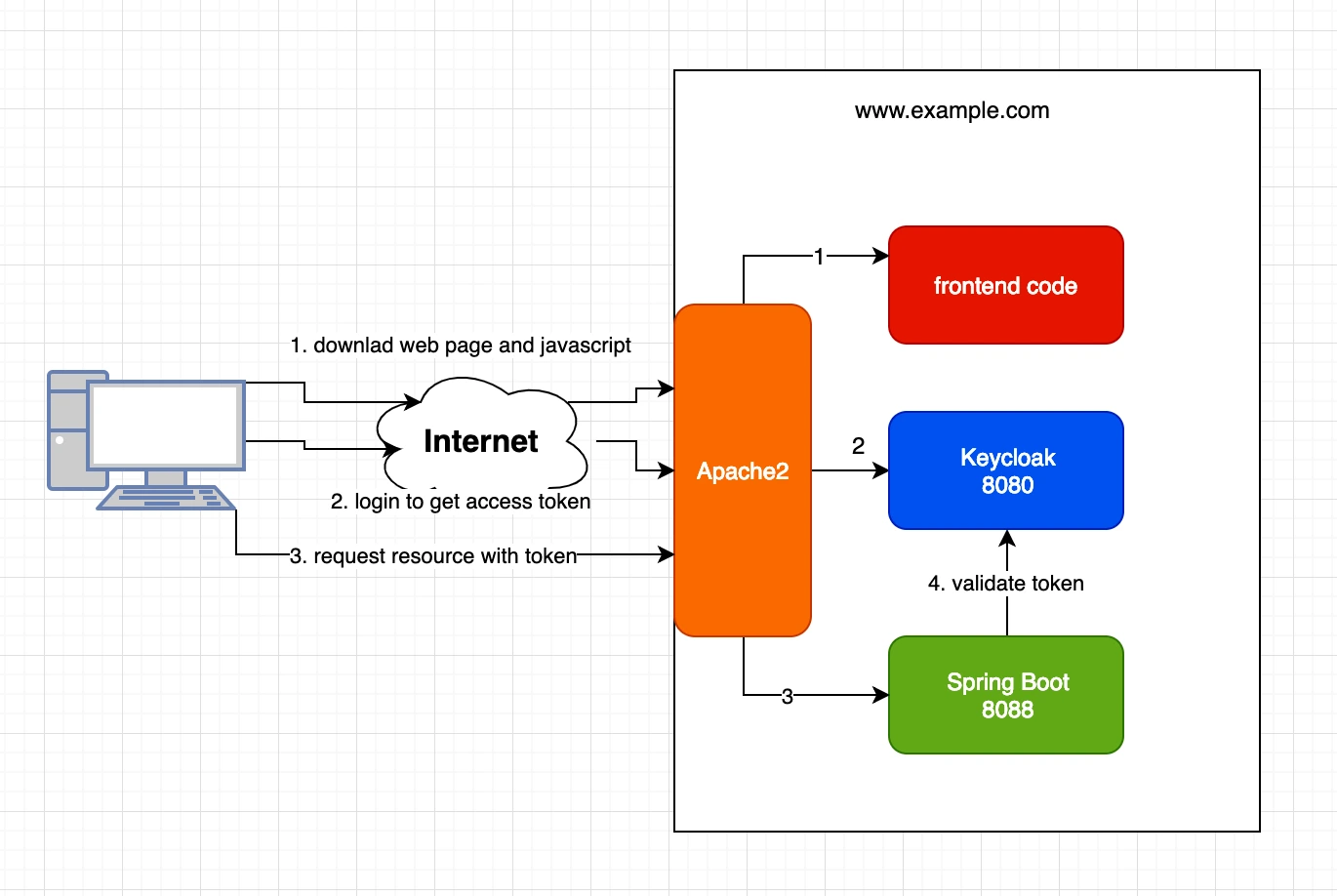
Customization gives you control. It allows you to decide the right access for your business data and set limitations. You do not need to be stuck with default settings. It's like your playground with your set of rules. It's your world, and you're in charge.
More importantly, customization strengthens your defenses by making it harder for anyone with ill intentions to break in.
Whether you're a seasoned software expert, a diligent business professional, or a newbie, remember this: customization will be your ally in enhancing digital security.
To create a custom required action in KeyCloak, you'll need to follow these steps:
The first step is to create a Java Archive (JAR) file containing the required action code. This code will define the behaviour of the required action, including what happens when a user completes it and what data is collected during the process.
1. RequiredActionFactory
2. RequiredActionProvider
The RequiredActionFactory interface is responsible for creating the Instance of the RequiredActionProvider.
                @Override
                public RequiredActionProvider create(KeycloakSession session) {
                    return new CustomRequiredActionProvider();
                }

                @Override
                public String getId() {
                    return “Custom_Action”;
                }

                @Override
                public String getDisplayText() {
                    return "Secret Question";
                }
We need to implement these methods from RequiredActionFactory in our CustomFactory.
The create method is used to return the instance of our RequiredActionProvider.
The getId method is used to set the id of our custom required action provider for keycloak to access it.
The getDisplayText method is used to show a familiar name in the admin console.
After implementing RequiredActionFactory, we will implement RequiredActionProvider interface.
                @Override
                public void requiredActionChallenge(RequiredActionContext context) {
                    Response challenge = context.form().createForm("secret_question_config.ftl");
                    context.challenge(challenge);
                }
The first method to implement is requiredActionChallenge method. This method is the initial call by the flow manager. It is responsible for rendering the HTML page required for initiating the required action.
In this method, the form method of RequiredActionContext class returns an instance of FreeMarkerLoginFormsProvider (implementing class of LoginFormsProvider). The createForm method of FreeMarkerLoginFormsProvider is used for rendering the HTML form.
createForm method takes a string as an argument which needs to be the name of the 'FTL' file.
The challenge method of RequiredActionContext class notifies the flow manager that a required action must be executed.
                @Override
                public void processAction(RequiredActionContext context) {
                    MultivaluedMap formData = context.getHttpRequest().getDecodedFormParameters();
                    //Business Logic
                    context.success();
                }
The next method to implement is processAction. This method is called to process the input from the HTML form. The action URL of the form will route to processAction method.
The form data is received from context.getHttpRequest().getDecodedFormParameters() method.
After completing the business logic context.success() notifies the flow manager that the required action was successful.
You will package your classes within a single jar. This jar does not have to be separate from other provider classes but it must contain a file named org.keycloak.authentication.RequiredActionFactory and must be contained in the META-INF/services/ directory of your jar. This file must list the fully qualified class name of each RequiredActionFactory implementation you have in the jar.
For example:
org.keycloak.examples.authenticator.SecretQuestionRequiredActionFactory
This service (or file) is used by Keycloak to scan the providers it has to load into the system.
Once you have the JAR file, you'll need to deploy it to the KeyCloak server. This can be done by copying the file directly to the server's deployment directory i.e., the providers/ directory.
The final thing you have to do is go into the Admin Console. Click on the Authentication left menu. Click on the Required Actions tab. Click on the Register button and choose your new Required Action. Your new required action should now be displayed and enabled in the required actions list.
Customizing Required Actions in Keycloak helps businesses improve security, ensure compliance, and create a smoother login experience. To implement these features effectively, it's best to hire Keycloak developers with expertise in secure identity and access management solutions.
Enhanced Security and Compliance
Contextual Multi-Factor Authentication: Ask users to complete extra verification steps, such as adding a mobile number for SMS OTP, only when needed.
Regulatory Compliance: Require users to accept updated Terms and Conditions before they can access the application.
Dynamic Risk Mitigation: Show additional security checks, such as CAPTCHA or security questions, when unusual login activity is detected.
Better User Experience
Progressive Profiling: Collect user information over time instead of asking for everything during registration.
Localized and Branded Forms: Create custom forms with your organization's branding and localized messages for a consistent user experience.
Conditional Prompts: Display profile update requests only to users who are missing required information, avoiding unnecessary interruptions.
Extended Business Logic
External Verification: Check user details with external CRM systems or third-party APIs during login.
Automatic Account Setup: Automatically assign user groups, permissions, or workspaces after registration.
Session-Based Actions: Apply custom rules during the authentication session based on your business requirements.
By customizing Required Actions, businesses can make their authentication process more secure, user-friendly, and better suited to their unique business needs.
Need Expert Keycloak Development?
Hire Keycloak developers from iFour Technolab to build secure, custom authentication solutions.
This blog has discussed the introduction of KeyCloak and its customization using the required actions. KeyCloak provides a powerful set of tools for managing authentication and authorization in modern applications and services. By customizing required actions, developers can tailor the user experience, enhance security, and extend the functionality of KeyCloak to meet the specific needs of their application. With a little bit of Java expertise, it's easy to get started with creating custom-required actions in KeyCloak, and the benefits can be significant.

A passionate Technical writer and an SEO freak working as a Content Development Manager at iFour Technolab, USA. With extensive experience in IT, Services, and Product sectors, I relish writing about Azure Cloud, Data Analytics, AI, & Workflow Automation and love sharing exceptional insights on various platforms. I believe in constant learning and am passionate about being better every day.


Build Your Agile Team
Recent Posts

Top AI Frameworks Recommended on Reddit For Enterprise Use
October 19, 2026


AI in Legal Practice: Powerful Use Cases Every Lawyer Should Know
September 10, 2026

How to Use Power BI for Sales Forecasting (Guide for CTOs)
August 06, 2026

AI in Power BI - Top Use cases and Best Practices
August 03, 2026
Categories
C# and Java remain the popular languages, offering robust functionality, libraries, and a huge developer community. However, both have certain distinctions leading to great confusion...

Spring Boot has long been a popular choice for developing custom Java applications. This is owing to its comprehensive features, impeccable security, and established ecosystem. Since...
Choosing the right programming language becomes crucial as it greatly influences the success of a software development project. When it comes to selecting the best programming language...

Get this Demo!
Get this Demo!
Get this Demo!
Get this Demo!
Get this Demo!
Get this Demo!